


1. Environment Preparation
1.1 Download and Run Charles on PC
1.2 Charles -> Tools Configuration
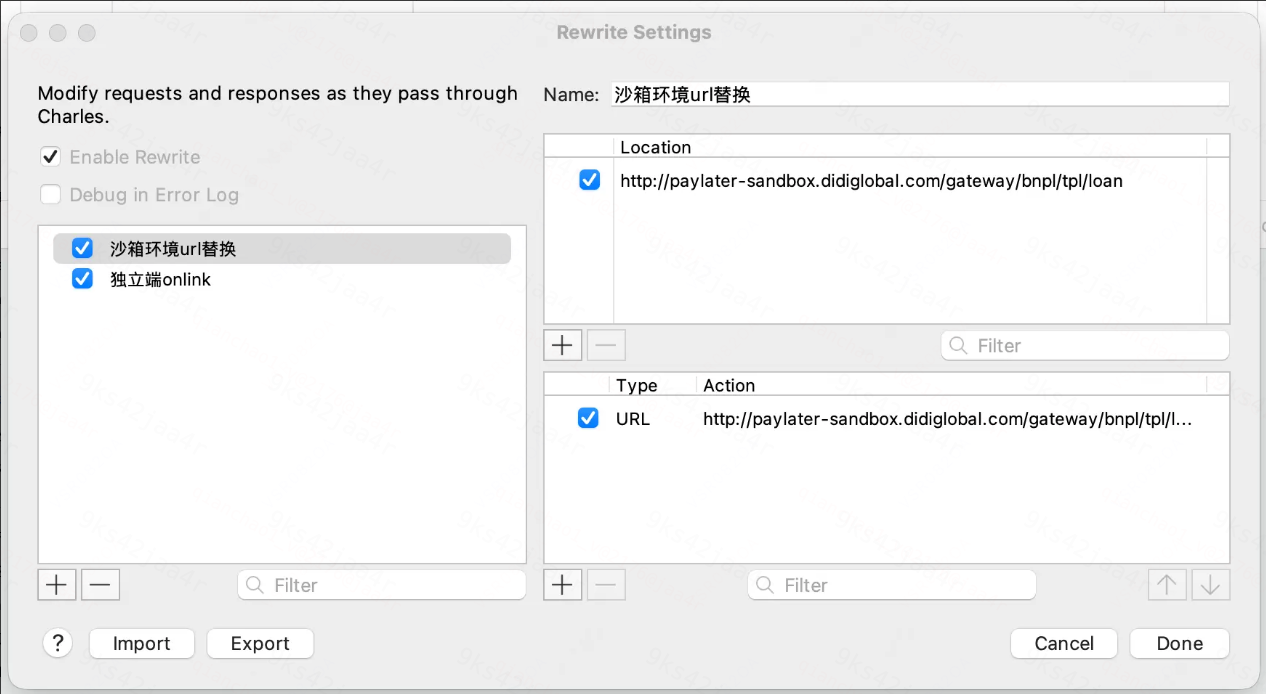
1.2.1 Import the Following Config File into Rewrite
Save the following content as a file: Rewrite_Sandbox.xml
<?xml version='1.0' encoding='UTF-8' ?>
<?charles serialisation-version='2.0' ?>
<rewriteSets>
  <rewriteSet>
    <active>true</active>
    <name>沙箱环境url替换</name>
    <hosts>
      <locationPatterns>
        <locationMatch>
          <location>
            <protocol>http</protocol>
            <host>paylater-sandbox.didiglobal.com</host>
            <path>/gateway/bnpl/tpl/loan</path>
          </location>
        </locationMatch>
      </locationPatterns>
    </hosts>
    <rules>
      <rewriteRule>
        <active>true</active>
        <ruleType>6</ruleType>
        <matchValue>http://paylater-sandbox.didiglobal.com/gateway/bnpl/tpl/loan</matchValue>
        <matchValueRegex>true</matchValueRegex>
        <matchRequest>true</matchRequest>
        <newValue>http://paylater-sandbox.didiglobal.com/freya-gateway/bnpl/tpl/loan</newValue>
        <caseSensitive>false</caseSensitive>
        <replaceType>2</replaceType>
      </rewriteRule>
    </rules>
  </rewriteSet>
  <rewriteSet>
    <active>true</active>
    <name>独立端onlink</name>
    <hosts>
      <locationPatterns>
        <locationMatch>
          <location>
            <host>api.didiglobal.com</host>
            <path>/\*?\*</path>
          </location>
        </locationMatch>
      </locationPatterns>
    </hosts>
    <rules>
      <rewriteRule>
        <active>true</active>
        <ruleType>7</ruleType>
        <matchValue>com.didiglobal.cashloan.inhouse</matchValue>
        <matchValueRegex>true</matchValueRegex>
        <matchRequest>true</matchRequest>
        <newValue>com.didiglobal.cashloan</newValue>
        <caseSensitive>false</caseSensitive>
        <replaceType>2</replaceType>
      </rewriteRule>
    </rules>
  </rewriteSet>
</rewriteSets>
Result:
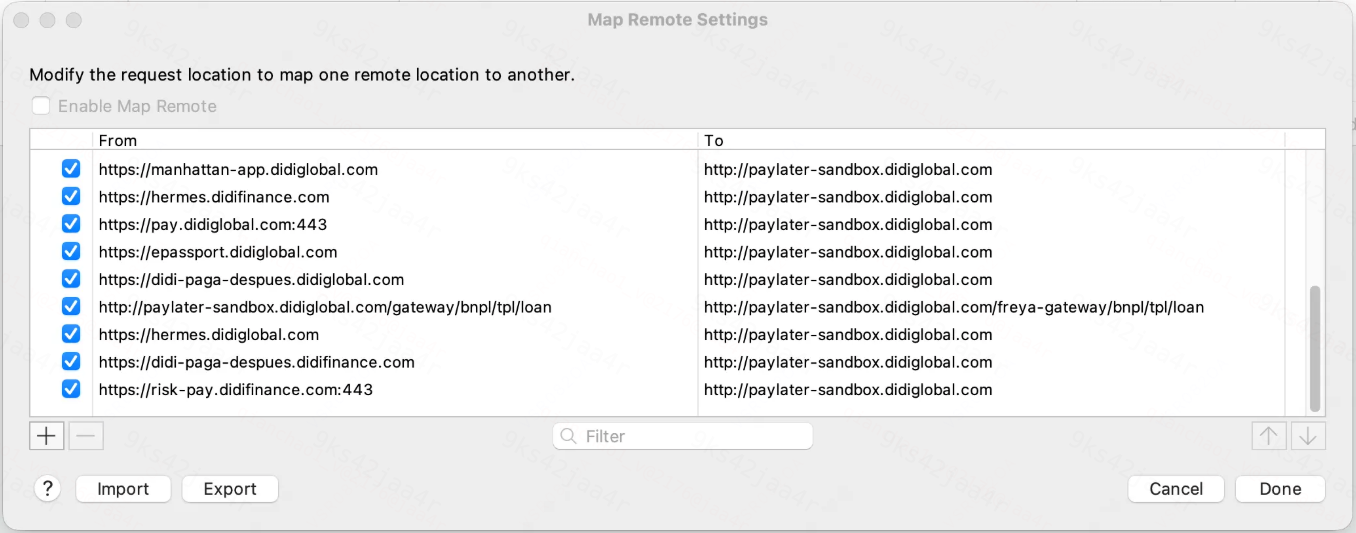
1.2.2 Configure the Following in Map Remote (import may fail; configure one by one)
If you want to try importing, save the following content as a file MapRemote_Sandbox.xml and import it.
<?xml version='1.0' encoding='UTF-8' ?>
<?charles serialisation-version='2.0' ?>
<map>
  <mappings>
    <mapMapping>
      <sourceLocation>
        <protocol>https</protocol>
        <host>manhattan-app.didiglobal.com</host>
      </sourceLocation>
      <destLocation>
        <protocol>http</protocol>
        <host>paylater-sandbox.didiglobal.com</host>
      </destLocation>
    </mapMapping>
    <mapMapping>
      <sourceLocation>
        <protocol>https</protocol>
        <host>hermes.didifinance.com</host>
      </sourceLocation>
      <destLocation>
        <protocol>http</protocol>
        <host>paylater-sandbox.didiglobal.com</host>
      </destLocation>
    </mapMapping>
    <mapMapping>
      <sourceLocation>
        <protocol>https</protocol>
        <host>pay.didiglobal.com</host>
        <port>443</port>
      </sourceLocation>
      <destLocation>
        <protocol>http</protocol>
        <host>paylater-sandbox.didiglobal.com</host>
      </destLocation>
    </mapMapping>
    <mapMapping>
      <sourceLocation>
        <protocol>https</protocol>
        <host>epassport.didiglobal.com</host>
      </sourceLocation>
      <destLocation>
        <protocol>http</protocol>
        <host>paylater-sandbox.didiglobal.com</host>
      </destLocation>
    </mapMapping>
    <mapMapping>
      <sourceLocation>
        <protocol>https</protocol>
        <host>didi-paga-despues.didiglobal.com</host>
      </sourceLocation>
      <destLocation>
        <protocol>http</protocol>
        <host>paylater-sandbox.didiglobal.com</host>
      </destLocation>
    </mapMapping>
    <mapMapping>
      <sourceLocation>
        <protocol>http</protocol>
        <host>paylater-sandbox.didiglobal.com</host>
        <path>/gateway/bnpl/tpl/loan</path>
      </sourceLocation>
      <destLocation>
        <protocol>http</protocol>
        <host>paylater-sandbox.didiglobal.com</host>
        <path>/freya-gateway/bnpl/tpl/loan</path>
      </destLocation>
    </mapMapping>
    <mapMapping>
      <sourceLocation>
        <protocol>https</protocol>
        <host>hermes.didiglobal.com</host>
      </sourceLocation>
      <destLocation>
        <protocol>http</protocol>
        <host>paylater-sandbox.didiglobal.com</host>
      </destLocation>
    </mapMapping>
    <mapMapping>
      <sourceLocation>
        <protocol>https</protocol>
        <host>didi-paga-despues.didifinance.com</host>
      </sourceLocation>
      <destLocation>
        <protocol>http</protocol>
        <host>paylater-sandbox.didiglobal.com</host>
      </destLocation>
    </mapMapping>
    <mapMapping>
      <sourceLocation>
        <protocol>https</protocol>
        <host>risk-pay.didifinance.com</host>
        <port>443</port>
      </sourceLocation>
      <destLocation>
        <protocol>http</protocol>
        <host>paylater-sandbox.didiglobal.com</host>
      </destLocation>
    </mapMapping>
  </mappings>
</map>
Result:
2. Test Phone Configuration (Must Have Google Mobile Services)
2.1 Install the Charles Certificate on the Test Phone
2.2 Install the DiDi Finanzas Package
2.3 Location Mocking Software
Enable developer mode and set the location to: 19.434351,-99.13311
3. Initiate Payment from the Merchant App, Select DiDi Paga Después, and Redirect to the DiDi Finance App
4. Acceptance Criteria
-
After the Merchant installs the DiDi test package, initiating a payment request can 100% successfully launch the DiDi App's native checkout page.
-
After a successful operation or cancellation on the native checkout page, it can seamlessly redirect back to the Merchant App, and the Merchant can correctly receive and parse the async/sync status.
-
If the Merchant uninstalls the DiDi test package, the Merchant can visit the H5 checkout page via automatical and smooth downgrade, with no system-level error.